Bioinformatics ReviewBioinformatics Review
Notification Show More
Font ResizerAa
  •  Home
  • Docking
  • MD Simulation
  • Tools
  • More Topics
    • Softwares
    • Sequence Analysis
    • Algorithms
    • Bioinformatics Programming
    • Bioinformatics Research Updates
    • Drug Discovery
    • Phylogenetics
    • Structural Bioinformatics
    • Editorials
    • Tips & Tricks
    • Bioinformatics News
    • Featured
    • Genomics
    • Bioinformatics Infographics
  • Community
    • BiR-Research Group
    • Community Q&A
    • Ask a question
    • Join Telegram Channel
    • Join Facebook Group
    • Join Reddit Group
    • Subscription Options
    • Become a Patron
    • Write for us
  • About Us
    • About BiR
    • BiR Scope
    • The Team
    • Guidelines for Research Collaboration
    • Feedback
    • Contact Us
    • Recent @ BiR
  • Subscription
  • Account
    • Visit Dashboard
    • Login
Font ResizerAa
Bioinformatics ReviewBioinformatics Review
Search
Have an existing account? Sign In
Follow US
PhylogeneticsSoftwareTools

How to calculate dN, dS, and dN/dS ratio on a set of genes using MEGA?

Dr. Muniba Faiza
Last updated: May 20, 2020 5:48 pm
Dr. Muniba Faiza
Share
2 Min Read
SHARE

If you want to get a quick idea about the non-synonymous vs synonymous (dN/dS) substitutions, you can easily use MEGA software [1]. Although HYPHY/Datamonkey provides the best results regarding selection pressure analyses. MEGA also uses HYPHY program [2] to calculate the dN/dS substitutions rate. Here is how you can do it.

You will need a codon fasta file genes, if you have protein sequences, then convert them into nucleotide codon sequences.

i) open MEGA --> Align --> Edit/Build Alignment --> Retrieve sequences from a file. (If you already have an alignment file then skip this step).

ii) Edit --> Select all --> Align by ClustalW/Muscle.

iii) Save the session and export alignment in MEGA format (.meg).

iv) Minimize the alignment window. Go to the main window and click on "Selection" --> "Estimate selection for each codon (Hyphy)".

v) It will prompt to select a .meg file, select it.

vi) It will ask for analysis preferences as shown in Fig. 1. Choose according to your requirements and click "Compute".
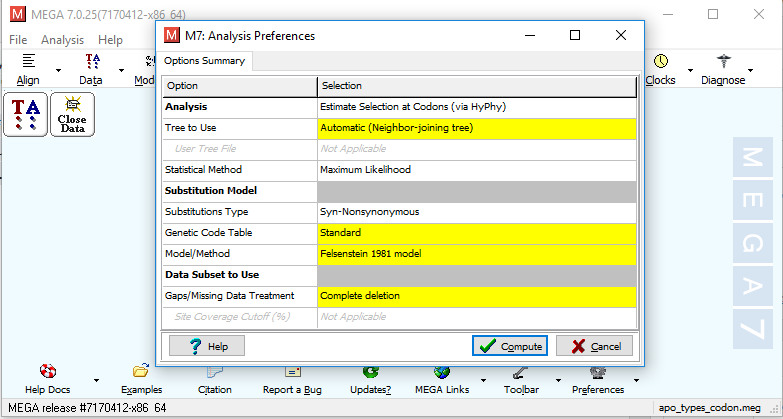
 

Fig. 1 Analysis preference window for dN/dS substitution calculation using MEGA7.

vii) Later, it will ask for the output format and output directory where you want to save the results. Click "Ok". Your job will be finished after a few minutes depending up on the number and length of sequences.

References

  1. Kumar, S., Stecher, G., & Tamura, K. (2016). MEGA7: molecular evolutionary genetics analysis version 7.0 for bigger datasets. Molecular biology and evolution, 33(7), 1870-1874.
  2. Pond, S. L. K., & Muse, S. V. (2005). HyPhy: hypothesis testing using phylogenies. In Statistical methods in molecular evolution (pp. 125-181). Springer, New York, NY.

TAGGED:Codon alignmentMEGASelection analysis
Share This Article
Facebook Copy Link Print
ByDr. Muniba Faiza
Follow:
Dr. Muniba is a Bioinformatician based in New Delhi, India. She has completed her PhD in Bioinformatics from South China University of Technology, Guangzhou, China. She has cutting edge knowledge of bioinformatics tools, algorithms, and drug designing. When she is not reading she is found enjoying with the family. Know more about Muniba
Leave a Comment

Leave a Reply Cancel reply

You must be logged in to post a comment.

ai tools vs traditional tools in bioinformatics
AI Tools vs Traditional Tools in Bioinformatics- Which one to select?
Algorithms Artificial Intelligence Machine Learning Software Tools
AI vs Physics in Molecular Docking
AI vs Physics in Molecular Docking: Towards Faster and More Accurate Pose Prediction
Artificial Intelligence Drug Discovery Machine Learning
10 years of Bioinformatics Review: From a Blog to a Bioinformatics Knowledge Hub!
Editorial
Starting in Bioinformatics? Do This First!
Tips & Tricks

You Might Also Like

CMake installation and upgrade: What worked & what didn’t?!
SoftwareTips & TricksTools

CMake installation and upgrade: What worked & what didn’t?!

March 13, 2025
Installing mgltools2 package on ubuntu
DockingSoftwareTools

Installing MGLTools2 package (ADFR/AGFR/AutoSite) on Ubuntu

October 17, 2020
GenomicsSequence AnalysisSoftwareTools

Roary: Analysis of Prokaryote Pan Genome on a large-scale

December 11, 2015
docking result visualization tools
DockingSoftwareTools

Most widely used software for docking results image generation

December 19, 2020
Copyright 2024 IQL Technologies
  • Journal
  • Customer Support
  • Contact Us
  • FAQs
  • Terms of Use
  • Privacy Policy
  • Cookie Policy
  • Sitemap
Welcome Back!

Sign in to your account

Username or Email Address
Password

Lost your password?

Not a member? Sign Up