Bioinformatics ReviewBioinformatics Review
Notification Show More
Font ResizerAa
  •  Home
  • Docking
  • MD Simulation
  • Tools
  • More Topics
    • Softwares
    • Sequence Analysis
    • Algorithms
    • Bioinformatics Programming
    • Bioinformatics Research Updates
    • Drug Discovery
    • Phylogenetics
    • Structural Bioinformatics
    • Editorials
    • Tips & Tricks
    • Bioinformatics News
    • Featured
    • Genomics
    • Bioinformatics Infographics
  • Community
    • BiR-Research Group
    • Community Q&A
    • Ask a question
    • Join Telegram Channel
    • Join Facebook Group
    • Join Reddit Group
    • Subscription Options
    • Become a Patron
    • Write for us
  • About Us
    • About BiR
    • BiR Scope
    • The Team
    • Guidelines for Research Collaboration
    • Feedback
    • Contact Us
    • Recent @ BiR
  • Subscription
  • Account
    • Visit Dashboard
    • Login
Font ResizerAa
Bioinformatics ReviewBioinformatics Review
Search
Have an existing account? Sign In
Follow US
Protein VisualizationSoftwareTools

Plugin to visualize CASTp results in PyMOL

Tariq Abdullah
Last updated: July 24, 2020 2:18 pm
Tariq Abdullah
Share
1 Min Read
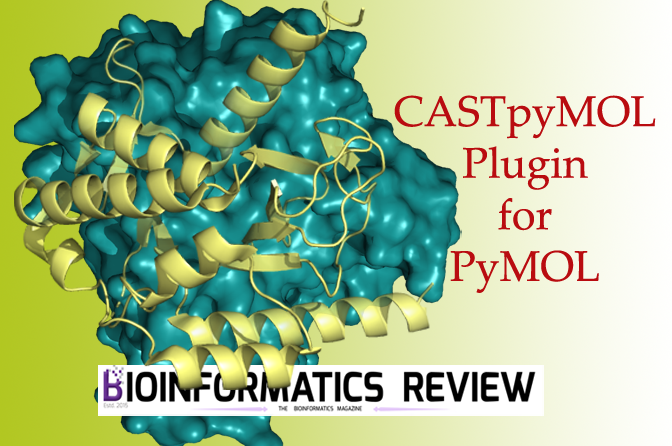
CASTpyMOL plugin for pymol
SHARE

CASTp (Computed Atlas of Surface Topography of proteins) server is used to predict binding pockets and cavities in proteins [1]. It displays binding pockets precisely and predicts all possible binding pockets or cavities based on an algorithm.

The pockets can be viewed in different colors and styles. CASTp server allows users to download their results. However, it is more convenient to visualize these results. For that purpose, there is a plugin called CASTpyMOL v3.0 that can be installed easily and all the results generated by the CASTp server can be visualized in PyMOL.

Installing Plugin

  1. Download the plugin from here.
  2. Open PyMOL.
  3. Go to ‘Plugin’ –> ‘Plugin Manager’.
  4. Click ‘Install New Plugin’ –> ‘Choose File’. Select the downloaded plugin file.
  5. Restart PyMOL.

Now you can open CASTp result files in PyMOL to visualize all predicted binding pockets. Additionally, you can view through its PDB or job id from the CASTp server.


References

  1. Tian, W., Chen, C., Lei, X., Zhao, J., & Liang, J. (2018). CASTp 3.0: computed atlas of surface topography of proteins. Nucleic acids research, 46(W1), W363-W367.

TAGGED:castp serverpluginPymol
Share This Article
Facebook Copy Link Print
ByTariq Abdullah
Tariq is founder of Bioinformatics Review and Lead Developer at IQL Technologies. His areas of expertise include algorithm design, phylogenetics, MicroArray, Plant Systematics, and genome data analysis. If you have questions, reach out to him via his homepage.
Leave a Comment

Leave a Reply Cancel reply

You must be logged in to post a comment.

ai tools vs traditional tools in bioinformatics
AI Tools vs Traditional Tools in Bioinformatics- Which one to select?
Algorithms Artificial Intelligence Machine Learning Software Tools
AI vs Physics in Molecular Docking
AI vs Physics in Molecular Docking: Towards Faster and More Accurate Pose Prediction
Artificial Intelligence Drug Discovery Machine Learning
10 years of Bioinformatics Review: From a Blog to a Bioinformatics Knowledge Hub!
Editorial
Starting in Bioinformatics? Do This First!
Tips & Tricks

You Might Also Like

SoftwareSystems Biology

BioMiner & Personalized Medicine: A new perspective

December 26, 2015
Calculate Binding Pocket Volume in Pymol (using PyVol plugin).
SoftwareStructural BioinformaticsToolsVideo Tutorial

Video Tutorial: Calculating binding pocket volume using PyVol plugin.

November 23, 2024
Circall- A new software for discovery of circular RNAs from paired-end RNA sequencing data
Software

Circall- A new software for discovery of circular RNAs from paired-end RNA sequencing data

October 27, 2021
Modeller- Uses & Applications
SoftwareTools

Modeller- Uses & Applications

November 11, 2021
Copyright 2024 IQL Technologies
  • Journal
  • Customer Support
  • Contact Us
  • FAQs
  • Terms of Use
  • Privacy Policy
  • Cookie Policy
  • Sitemap
Welcome Back!

Sign in to your account

Username or Email Address
Password

Lost your password?

Not a member? Sign Up